Bug Reporting
Traceo: A Better Way to Report and Fix UI Bugs
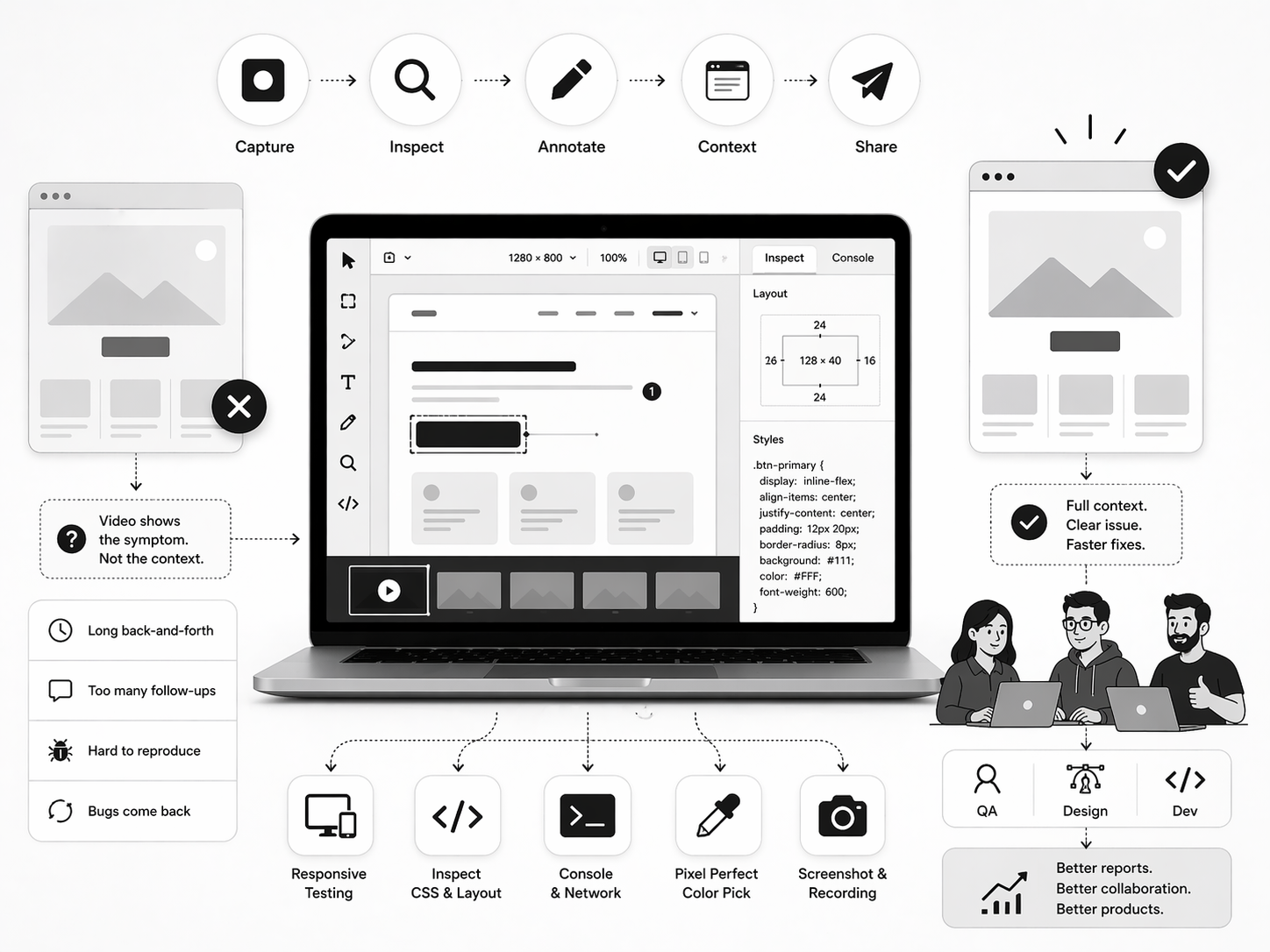
Screen recordings show what happened, but they rarely explain why. That gap is one of the biggest problems in bug reporting today.
Traceo is built for teams that want a single, streamlined workflow instead of juggling multiple tools. It brings capture, inspection, annotation, and sharing together so bug reports are clearer and easier to act on.
Why Video Alone Is Not Enough
Modern UI bugs are rarely straightforward. A layout might break only at a specific breakpoint. A button may overflow on mobile. A contrast issue could appear only in dark mode. Some regressions show up only after a sequence of interactions.
In these cases, a video shows the symptom, but not the context.
Effective bug reports need more than motion on a screen. They require layout state, environment details, browser behavior, and enough precision to turn "I can't reproduce this" into a fix that can be shipped.
What Traceo Solves
Traceo reduces the back-and-forth that slows teams down after a bug is reported. Instead of sharing a short clip and waiting for follow-up questions, teams can capture everything in one flow and move forward without interruption.
The goal is simple: make bug reports instantly understandable for developers.
When the right context is included from the start, triage becomes faster, reproduction becomes easier, and fewer issues bounce between QA, design, and engineering.
How the Workflow Fits Together
Traceo's strength is not just in individual features, but in how they work together. You can capture an issue, inspect the UI, annotate what is wrong, and share the result in one place.
This includes:
- inspecting layout and CSS to turn "it looks off" into actionable data,see Traceo's UI inspection and CSS inspection guides
- testing responsive behavior across different screen sizes
- capturing screenshots and recordings for interaction-based bugs,often alongside Traceo's bug recording workflow
- reviewing console and network activity for debugging signals
- picking colors at the pixel level for precise visual feedback
Why It Matters for Teams
Better bug reports save time. They reduce back-and-forth, speed up triage, and help developers reproduce issues faster. They also keep design, QA, and engineering aligned by providing the right context from the start.
This is especially valuable for teams dealing with visual bugs, layout issues, responsive behavior, and contrast problems. Traceo turns bug reporting from a messy handoff into a clear, efficient process.
Final Thought
Traceo brings capture, inspect, annotate, and share into one unified workflow. It helps teams move from "I saw a problem" to "we fixed it" with far less friction.
If your team wants a smarter way to capture, understand, and resolve UI issues, Traceo provides a workflow that brings clarity to every bug report.